Portfolio Tracker with Live Prices and AI Research
- A privacy-first portfolio tracking app – no broker connections
- Tidy layout – nothing noisy or confusing
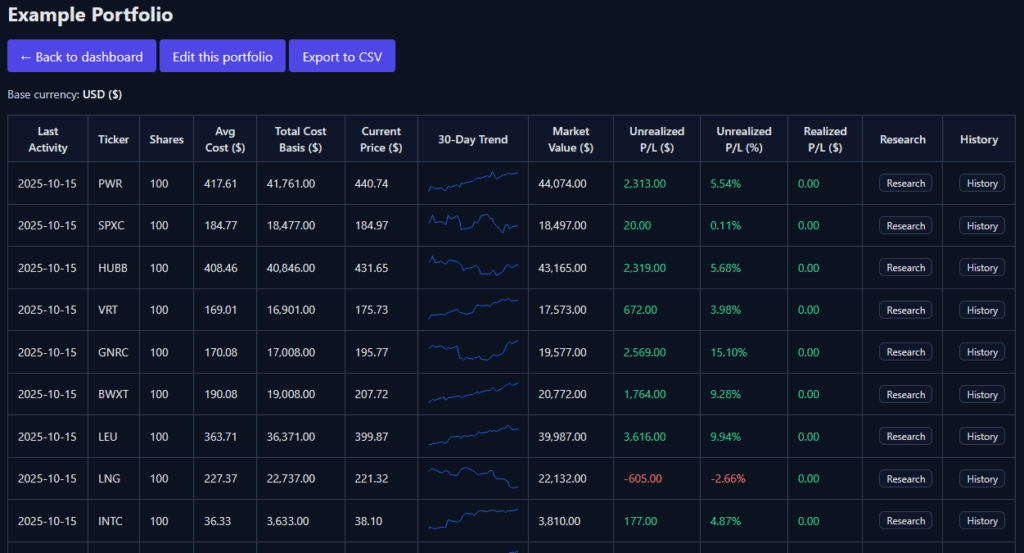
- Live stock prices stream into a clean table
- 30-day sparkline per ticker; hover to pop a 3-year chart
- AI stock research: quick briefs and curated links
- CSV import/export and optional read-only public share
What it is and who it’s for
This is an ultra-simple portfolio tracker built for investors who want to track their investments and quickly access research – without connecting a brokerage. You can enter or CSV-import positions, see prices stream into a tidy table, peek at a 3-year chart on hover, and open an AI research view that gathers the official materials you’d otherwise hunt down manually. It’s private by design, with optional unlisted read-only sharing when you need to show someone your summary.
AI research that speeds due diligence
Think of the research panel as a concise, structured brief for each ticker, purpose-built to reduce tab overload and “where was that link?” hunting.
One-click briefs include:
- Snapshot: plain-English overview
- Links: curated links view with official sources
- Products
- Headlines
- Competitors
- Moat
- People
- Earnings
- Notes
- Models
CSV import and owner-only export
- Import that just works: Paste or upload CSVs; the parser auto-detects common header names (Symbol/Ticker, Quantity/Shares, Price/Cost or total cost basis, Date), handles commas/semicolons, US/EU decimals, and typical date formats. It skips cash lines to keep totals clean.
- Export for your records: Owner-only CSV export lets you back up or analyze externally.
- Edits are easy: Fix a ticker, adjust a lot, or remove an obsolete holding without wrestling with hidden cells.
Private by default + read-only sharing
- No broker connections. You control what you enter and what you share.
- Private by default: Portfolios live in your account
- Unlisted share link (optional): Enable a read-only public share to show a summary only (no charts or research); disable it anytime.
Account and billing
- Email + password with email verification for access control.
- Stripe checkout and a self-serve billing portal for upgrades, invoices, and cancellations.
- Self-serve account deletion.
Portfolio tracker app vs spreadsheets and vs broker apps
| Feature | This app | Spreadsheets | Broker apps |
|---|---|---|---|
| Research speed (one-click vs manual) | One-click briefs + curated links | Manual linking & upkeep | Basic; scattered across tabs |
| Privacy | No broker connection; private | Private, if local | Requires full broker access |
| 3-year chart | Hover to open | Manual charting | Yes; varies by broker |
| CSV import | Header/locale/date auto-detect | Yes, but DIY parsing | Limited or broker-specific |
| AI research | Built-in; 9–10 topic briefs | Third-party add-ons or none | Limited; marketing-heavy |
| Sharing (read-only) | Unlisted summary; no research | Shareable | Rare; requires recipient login |
| Cost/commitment | Check current pricing | Free but time-intensive | “Free” but tied to brokerage |
Limitations
- No broker sync (by design). Workaround: CSV import from your broker exports; update periodically.
- Equity-focused today. ETFs and common equities work best; exact ticker formats may be required for some listings (e.g., dots/dashes).
- No dividends, rebalancing, multi-currency, tax lots – yet. Interim workaround: track totals and notes in your portfolio name or a companion sheet, and use owner-only export for further analysis.
Short disclaimer
This article is for information and product education only and is not investment advice. Investing carries risk, including loss of principal. Do your own research and consult a qualified advisor where appropriate.